[Home] [Contents] [Index]
Help
Navigating through frames can be a bit confusing.
The following figure shows the layout of the screen.
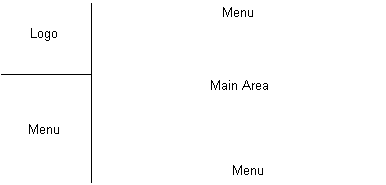
The following features can help you navigate.
- Each topic has a menu on the top and on the bottom. The home page has a menu on the bottom.
- The upper left section of the screen contains the Afourar Moroccan Tours logo. If you click on the graphic, you will return to the home page.
- The lower left section of the screen contains a menu. (You may need to scroll through this section.)
-
If you get lost, you can press the right mouse button to get a browser menu that includes a "Back" option. Note:The home page contains a hotspotted graphic (client side image map). If you use this "Back" option, the hotspots can be lost; if so, you can reload the page.
 carrig@cybercom.net
[Home] [Contents] [Index] [Top]